Work has been underway for months now on switching over from the Windows appointment API to the Microsoft Graph API and rebuilding all of that infrastructure. I am starting to use test builds myself and they are getting good!
If you would like to test a beta build of Ink Calendar and Journal version 3.0 fill out the form below and I’ll add you to the testing group!
A new little lock icon has been added which when activated locks the writing canvas to make it easier to write without disruption. Windows tries to ignore other touch interactions like palms or bumps, but sometimes a manual lock is what is needed. I’ve always wanted this feature in OneNote for the same reasons so now I brought it to Ink Calendar and Journal!
Additionally I have improved the way items like image and text work with tap to deselect or tap to select. Hopefully this whole experience is better and more robust. Bugs have been found and fixed as well!
As always thank you for using Ink Calendar and Journal, and if you have any questions, feedback, or issues please reach out!
Work has been underway for a few weeks now on the next update to Ink Calendar and Journal. Two new features are working and a going to be great! One is an easier way to get images on to your calendars, and the other is a way to be more productive by converting your handwritten ink to text.
Adding images to Ink Calendar has been an option for a while but it required a few taps. Now you can drag and drop one or more images from File Explorer right onto your calendars and they will drop on! It is a fun and easy way to make your calendars even more personalized!
Dragging and dropping 3 images onto the Day View
While I have been using Ink Calendar I have wanted the app to be more productive when it comes to meeting notes. The first step in this process is making it possible to copy Ink as text, then use that text elsewhere. Copying meeting notes from Ink Calendar and pasting them into the body of an email or into a Word doc makes it so much easier to take advantage of the handwritten notes.
In addition to new features I am always working to make Ink Calendar less buggy and more stable. Hopefully this release makes good progress on that front!
As always, thank you for using Ink Calendar and always feel free to reach out with questions, concerns, or comments.
I have been hard at work on the next feature version of Ink Calendar. This version is bringing Journals, a feature which many users have requested for a while now. Unlike the other calendar views Journals do not have dates and are not tied to dates in any way. There are a few different styles to choose from and offer the flexibility to make Ink Calendar work for you!
Journal Builder PageBullet Journal and Graph paper backgrounds
The app has been submitted to the Microsoft Store now all I do is wait! As always thank you for using Ink Calendar and it brings me so much joy knowing people use this app every day!
Work has been going well on Ink Calendar 2.1. The major new feature is selection time. This feature is simple; on week and month views, show text of when the selected ink is. There is a dot which will highlight the exact location being picked when trying to understand the date.
I personally find this feature useful when planning out an itinerary for trips. When I’m zoomed in tight on a week view it can be hard to tell which hour is which and which day is which. Now with selection time it is obvious.
In addition to selection time 2.1 should be faster to load views, more memory efficient, and hopefully fixes a few bugs.
Work is coming along quite nicely on the next version of Ink Calendar. This next update has two major features.
1. Day View Agenda
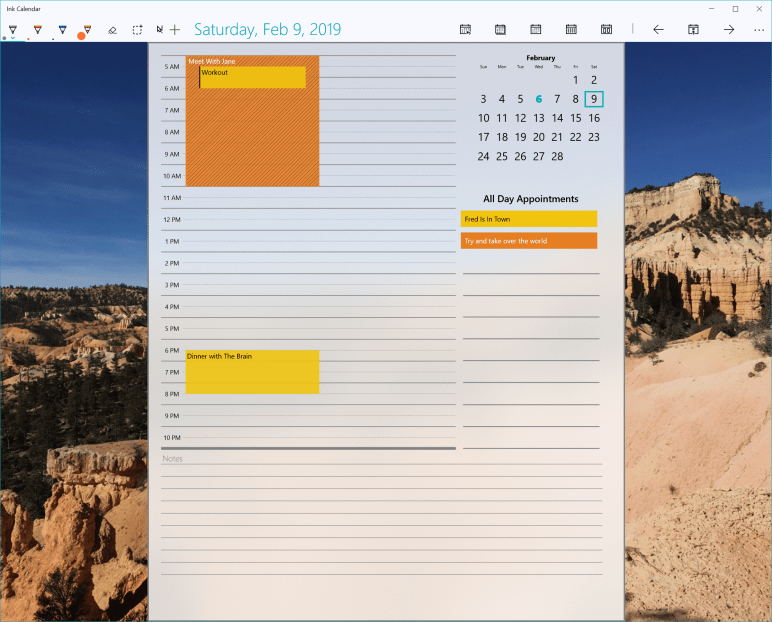
The Day View has been reworked to be more useful and powerful. Now every day see a break down of what is on your calendar for today. Use the agenda to organize time over the day and plan your time well. There is a customizable hour by hour area, a place for all day appointments, and a bottom area for notes.
If you prefer a standard dot grid, that is still an option. This new view will be the default, but the setting is there to change it back to the dot grid if you prefer.
2. Better Settings
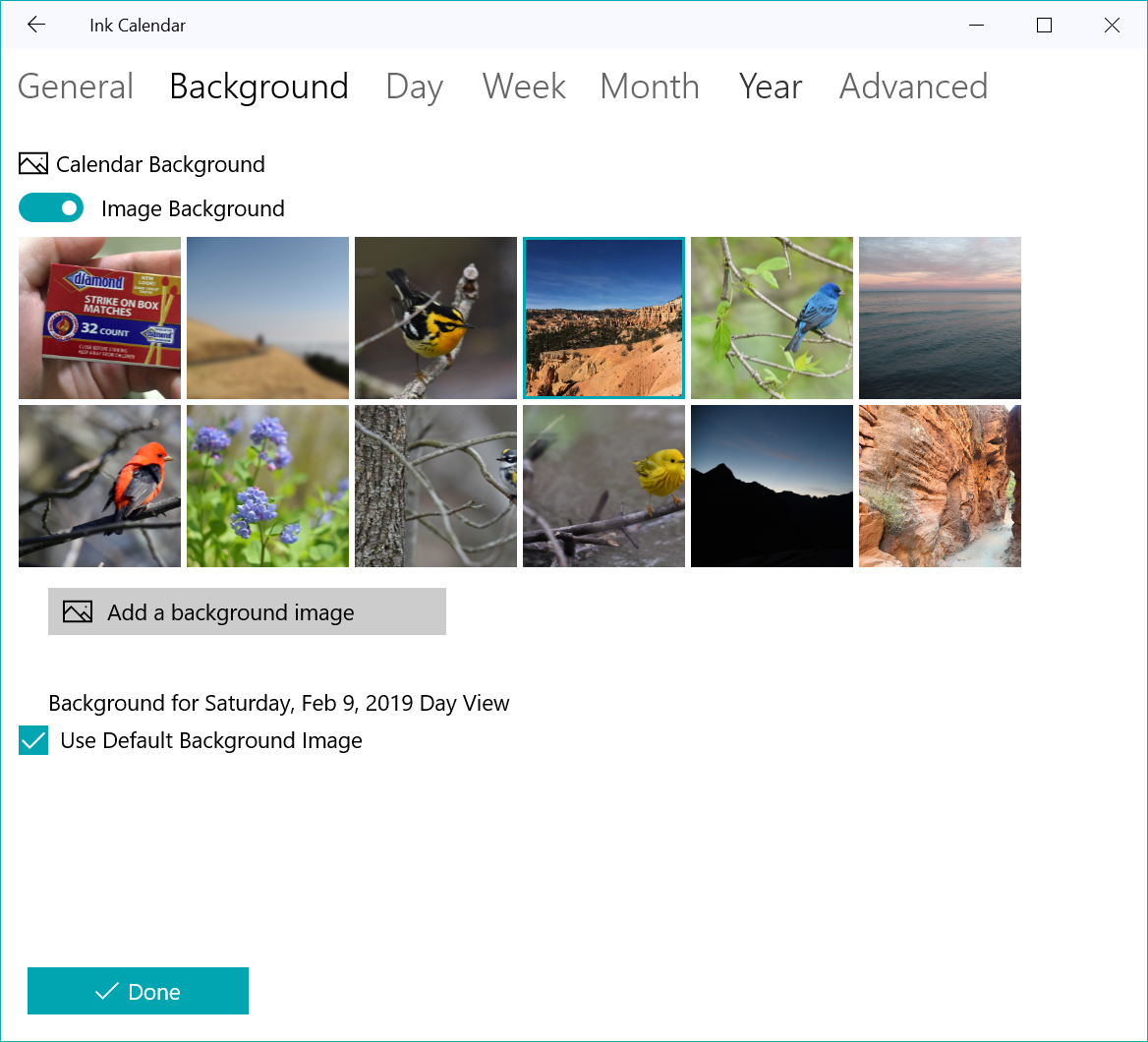
The advanced settings area is now more intelligent and works better. But more noticable are the new background options available to everyone! Pick from a gallary of new choices. Mostly landscape and nature shots, with all custom backgrounds included as well.
Background Image Options
If none of these suit your needs then feel free to add your own background as always. These images were chose for their diverse and rich color pallet which should make a great background behind the acrylic calendars.
That is it for now, thanks again for using Ink Calendar.
Update 1.19 is rolling out to the Microsoft Store now. This update brings a highly requested features: natural swiping between views. Now you can change the view by swiping or by clicking the next/previous buttons as always.
This change introduced a fairly major change to the way Ink Calendar handles the different sets of ink + calendars. I have done lots of testing for performance and found it to be acceptable. However it is impossible for me to test every device. I’ll be watching the crash statistics and will continue to optimize Ink Calendar with future updates.
Hopefully this update makes Ink Calendar more natural and easier to use. If you have suggestions, comments, or feedback then please reach out by email (support@inkcalendar.com) or twitter (@thejoefin).
Thanks again for using Ink Calendar.
Joe
P.S. If you are a digital artist using Ink Calendar and are interested in being paid for some promotional artwork please reach out and we can work something out.
In the latest update there are two visible features added to the Week View. The first is a line showing the current time (of the current week). The other visible change is a texture given to calendar appointments to distinguish between different states of ‘busy.’ These textures mirror the ones provided by Windows for continuity and clarity.
The current time indicator for the month view looks the same, but now will move to the next day if Ink Calendar is left open over night. In the same way the Week View current time indicator will move to indicate the current time when the app is left open. This makes it easy to locate where “NOW” is when glancing at a week view.
Other than these changes I have made improvements to the way the Week View displays appointments. There was some odd behavior happening when there were several overlapping appointments. Also appointments sometimes not showing the correct end time when the appointment crosses over between weeks has also been fixed.
Thanks for using Ink Calendar. Let me know what you think and what you’d like to see improved.




 Ink Calendar and Journal