Organized Settings and Appointments On This Day changes in 1.15

Appointments On Changes in 1.15

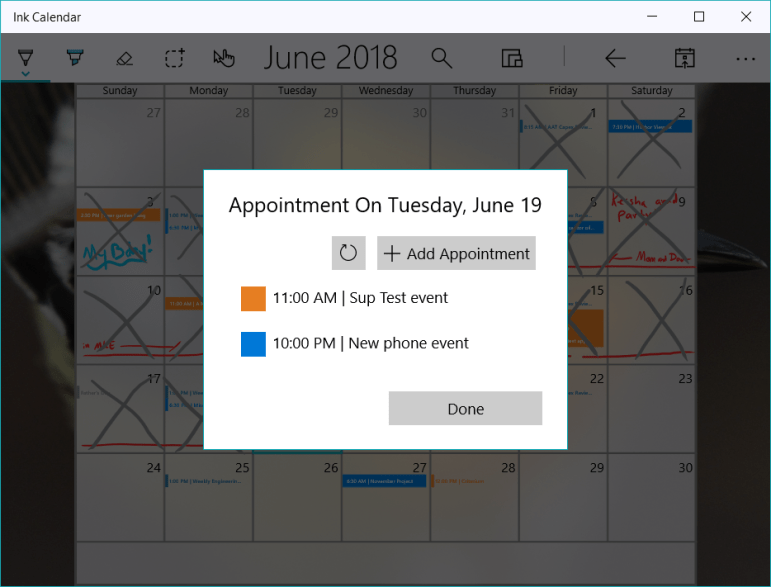
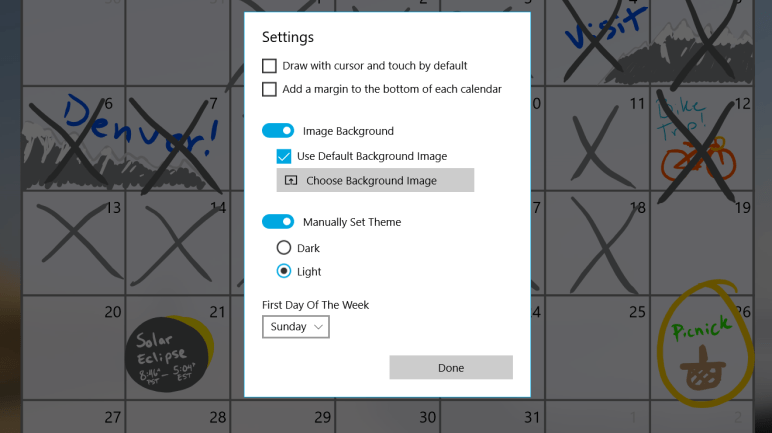
Two areas of focus for 1.15 have been organizing the app settings and improving the ‘Appointments on this day’ dialog. Organizing the settings and changing how it is displayed gives space to add more features and give users the ability to customize their experience.

Settings in Pivot for 1.15

The changes to the ‘Appointments on this day’ dialog are focused on adding more appointments without a pen. This makes Ink Calendar span the usage scenarios more gracefully from pen & touch to keyboard & mouse.

As always there are small improvements and bug fixes wherever I can find them.

Thanks for using Ink Calendar!

-Joe

Enjoy Ink Calendar in your own language

In the new update 1.14 Ink Calendar will use the language settings you have set in Windows 10. The month names, days of the week, and day abbreviations will all be translated automatically by Windows.

Next up I will be translating the text in the app itself. All the button text will soon be translated with the help of anyone I know who speaks that language! If you’d like to help translate then email support@inkcalendar.com

As always, thank you for using Ink Calendar

-Joe

Drag, Quick Actions, and more coming soon

The latest update to Ink Calendar has been submitted to the store. Version 1.12 brings a few big features and improvements all around.

Key New Features

MoveAddWeekSmall

  • Drag selected ink around the calendar.
  • Preform common ink related tasks from the new Quick Ink Actions menu.
  • Add events from ink on the Week and Day views.
  • From the right click menu view all the calendar events on a day.
  • Jump to the week view or day view of a day from the right click menu.
  • View events on the Week view

Improvements

  • Many bug fixes.
  • Improved the tiny app icons.
  • Added the user accent color throughout Ink Calendar.
  • Adding an event from ink works better and more reliability.
  • Event text is white unless the event is too bright then the text is black.

Those are all of the main changes. I’ll be sharing more screenshots and GIFS of all these new features in action.

Thanks for using Ink Calendar

-Joe

Advanced Settings for 1.10

Version 1.10 will not be a big release from forward facing features but it will provide some much requested advanced settings. These are settings for people who are interested in making backups of their ink and deleting all their ink.

Another big element of this release is using the roaming app data service to sync ink between devices. I’ve named this ‘slow sync’ because this service is very slow. While slow it does work and is free for me to implement so I decided to add this as a feature for those who want to try to use it.

With the slow sync come the risk of overwriting ink from one device by inking on another device. To reduce this issue I’ve added the ability to backup and load ink, and the ability to set a device as a view-only device. These view-only devices will not save the ink and this should reduce the risk of ink overwrite.

There are many little things which can go wrong when implementing features like these so please be careful and let me know if something doesn’t work the way you think it should.

Thanks for using Ink Calendar,

Joe


P.S. The support@InkCalendar.com email was broken because of a domain name thing, but it is fixed now.

P.S.S. Microsoft is having technical troubles with flights so I don’t know when this update will get pushed out.

1.8 Will Bring Week View

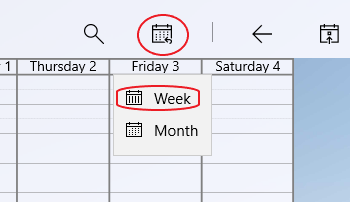
Ink Calendar 1.8 will bring a week view option to the calendar. This means users can switch between week or month views. Switching happens from a button in the top bar next to the zoom button.

WeekViewButton

In the settings you can change the start and stop times of the week view to fit your needs. Share, save, and print your week calendars just like you can with month calendars.

I find the week view is nice for planning my day and thinking about all the different projects I’ll be working on. Currently there is no calendar support in the week view but I plan on working on that next.

RateReviewBTN

Tucked away under the more button, a new ‘rate and review’ button was added. I would really appreciate a review if you use the app please consider leaving a review. If there is something you want added let me know!

Thanks again for using Ink Calendar!

-Joe

Version 1.6.3 is on the way!

This week I’ve been working on adding some intelligence to Ink Calendar. After selecting some ink you can add an appointment to the calendar. Using the Windows Ink APIs the ink will be converted into text and used to build the event.

The simplest implementation of this involves adding the text as the subject of the event on the day the ink is centered. More advanced implementation involves looking for time and using that to set the start time of the event. Furthermore if the ink spans several days the even should span those days as well.

LunchAt1230PMForWeb

This is a first implementation of this technique. Let me know what you think, how well does it work for you? Does it read your ink or not?

As always, thanks for using Ink calendar!

-Joe


1.4 has been submitted

Version 1.4 settings

I have submitted update 1.4.3.0 to the Windows Dev Center. The update should roll out in over the next few days. This update brings two external changes.

  1. Adjusted app icon
  2. Choose the first day of the week

There are many fixes and adjustments under the hood where I made improvements to the organization of my project and code efficiency. I also fixed the bug which was preventing the app from sharing the calendar.

The adjustments to the app icon was subtle and simply turned the pen and pen stroke from blue to white with a 50% transparency. Originally I had thought I would use the blue color more in the design and UI of the application, but that ended up not being the case. Since the only place the color was used was in the icon I decided to change it. Now the user’s accent color will show through and the icon should blend in with other Windows 10 icons.

One of the code improvements I made with this update was in the  calendar generation code. My first attempt at writing code to draw the calendar was bulky, length, and does not scale well. I rewrote how the app generates a calendar and this method made it easy to add the first-day-of-week setting. This setting would have been extremely painful to do with my old code. The new code made it quick and easy!

One little oddity of the first-day-of-week setting is that the ink on each day does not move. I decided this would be acceptable because there would be no good way to shift the ink around in a way that makes sense for everyone. I thought it would be easier to not move the ink and the user can shift days around if they want to. I may revisit this in the future if there is a desire for the app to cut and move the days when this setting is changed. Ideally this setting will be set once and not changed.

Part of this update involved breaking the settings and about dialogs off onto their own pages. This involved me changing the way the pages behave when those dialogs were opened. Now that the dialogs have been separated it will be easier for me to add more dialogs for features down the road.

Thanks and happy inking!!

-Joe